Documentation / Features
Interface
In a text game the scrolling text is the interface, so Emunah's panels sit around it and never over it. They draw from the same state the curing engine acts on, so what you see is what Emunah is about to do.
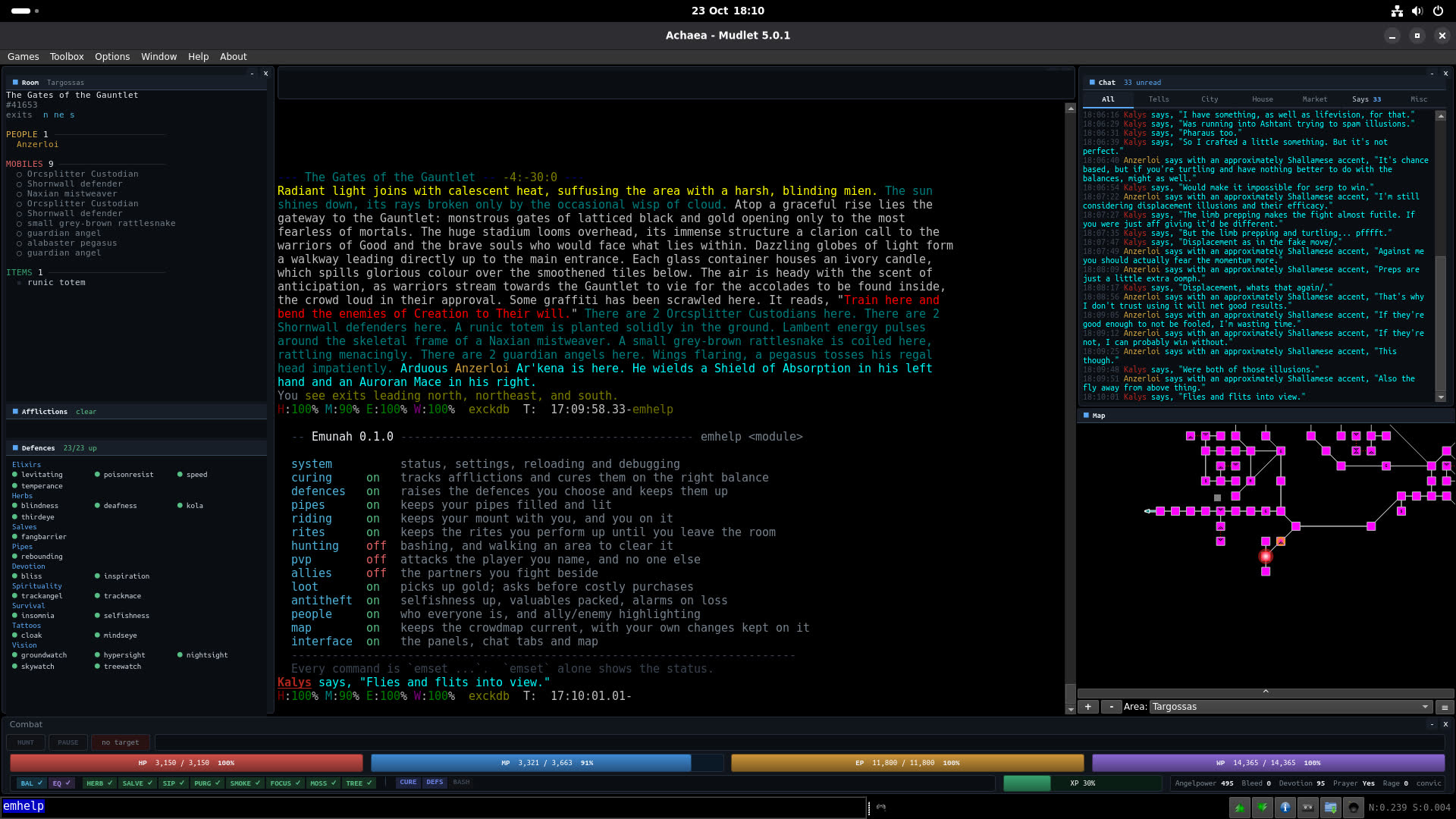
Layout
| Where | What |
|---|---|
| Left | The room, your afflictions and your defences, one above the other. |
| Right | Chat in tabs, and the map beneath it. |
| Bottom | The combat HUD: buttons, target, vitals and the balance strip. |
| Top | A scrolling ticker for anything you must not miss. |
Each region is a Mudlet window you can move and resize, and the game text's borders follow them, so a panel never covers a line of text.
Sizing the left column
The left column divides its height by what each panel actually holds, so a crowded room or a long defence list is shown in full. When it cannot all fit, defences go to more columns and short item names pair up before anything scrolls. A panel that needs more room gets it at once, but gives room back only after three seconds without needing it, so afflictions coming and going in a fight do not shake the panels below them.
To size afflictions or defences yourself, drag the divider along the panel's top edge; it lights when the mouse is over it. The panel keeps the height you gave it and shows as much as fits, and the room takes what is left. Double-click the divider, or type emset ui auto, to hand it back to sizing itself. Resizing the window or the column lays the panels out again.
Room
Where you are, with the room's number, exits and any shop or bank. Then three groups, each with a count:
- People, coloured the same way names are coloured in the game text.
- Denizens, each one clickable. A filled dot means the hunt will attack it and a hollow one means it will not; a click adds or removes that kind from the area's kill list.
- Items, with identical items collapsed into one row and a count.
While you are walking somewhere, the panel shows where to, the steps left and roughly how long, with a link to stop or carry on. The game leaves out anyone shrouded, hidden or phased, so the people list is everyone the game admits to, not necessarily everyone there.
The room's area is also added to the end of the room-name line in the game text (ui.roomArea).
Afflictions
Afflictions are listed in curing order, and each row answers what Emunah is doing about it:
| The row says | Meaning |
|---|---|
| curing | The cure has been sent and the game has not answered yet. |
| next | Everything is ready; it goes out on this prompt. |
| herb 1.4s | Its balance is recovering, and this is how long is left. Rows queued behind it show their place instead. |
| × paralysis | Its only route is shut by another affliction, named. |
| held: inquisition | A situational rule is holding it, and why. |
| a reason | Why Emunah refused it, such as "in the rift", so a refusal never looks like a hang. |
A filled dot means the server reports the affliction; a hollow one means only the game text has, and it is waiting for the server to confirm it. Above the rows, any state that holds every command (stunned, asleep, prone, unconscious, or an arm off balance) shows as a pill. Below them, one line per blocking affliction reads off which balances it shuts.
Defences
Defences are grouped by what raises them: elixirs, herbs, minerals, salves and pipes first, then each skillset by the game's own name for it (Devotion, Tattoos, Vision and so on), then anything Emunah cannot place. Only the defences you have switched on with emset defs are listed, in alphabetical order within a group, so the rows change only when that list does. A defence that is up is green. One that is down is yellow if it is on defup, and bright red on a red background if it is on keepup. Nothing moves when a defence drops or comes back; only its colour changes. The title counts how many are up out of how many are listed, and how many kept-up defences are down. They are always three to a row, and the panel is only as tall as its rows. See Defence maintenance.
The combat HUD

Three rows, directly above the command line:
- Buttons, target and status. HUNT starts or stops a hunt, and is lit while one runs. PAUSE pauses or resumes curing and defences together, the same as
pp, and reads PAUSED in red while they are off. Then your target's health bar, PvP and its target, and the commands sent and not yet answered. - Vitals. Health, mana, endurance and willpower, each with its percentage and its change since the last prompt.
- Balances. The balance strip, the CURE, DEFS and BASH switches, then experience and your class's own figures, such as devotion for a Priest.
The balance strip
One cell for balance and equilibrium, then one for each curing balance: herb, salve, sip, purgative, smoke, focus, moss and tree.
| The cell | Means |
|---|---|
| Green, with a tick | Ready. |
| Blue, with an arrow | A command was sent on it and the game has not answered. |
| Grey, with seconds | Recovering. The game's own figure where it states one. |
| Red, with a cross | Shut by an affliction, or by paralysis. |
| Dim | Nothing to use, such as the tree cell with curing.tree off. |
The strip applies exactly the rules the queue does, so it cannot show a balance as ready that Emunah would not send on.
On the prompt
A few things are added to the end of your prompt, where you are already looking:
- The lock you are in, as
(lock: soft), and any instant kill you are open to, as(danger: reave 8s). - A walk's destination and the steps left, then that it arrived (
map.showSteps), and a red mark while an enemy is in the room during one. - That your mount is not with you, when it has been gone too long to be walking in behind you.
- That your mace is not in hand, as
(mace not wielded)or(mace on the ground), until it is wielded again.
Chat, map and ticker
Channels are captured into tabs: All, then tells, city, house, market, says and the rest, chosen and ordered with ui.chatTabs. A tab you are not looking at counts what it missed, tells in the warning colour, and the chat's title bar sums them. Only the tab on screen is drawn into; the others catch up when you show them, and each keeps its own scrollback. Clicking a line's time puts the reply on the command line. History is kept per tab and survives emreload.
emset chat shows the tabs; emset chat mute <channel> keeps a channel out of the window, and emset chat route <channel> <tab> sends it to another tab. Capture and display are separate, so one failing never takes the other with it.
The map sits below the chat, follows you, and lights the route of any walk. emset map size small|big|biggest gives it 30%, 50% or 70% of the window's height, ui.mapFloat detaches it into its own window, and emset ui map off hides it. See Map and walking.
The ticker across the top scrolls continuously, up to three messages at once, for notices that must not scroll away, such as having no shield wielded. A label in the game window says when curing or keep-up is paused, so a system quietly doing nothing is impossible to miss.
Names in the text
Known people are coloured where they appear in the game text, by what they are to you: dark red for your city's enemies, green for allies, otherwise their city, with any other enemy underlined. Weight carries the rest, such as a Dragon or someone you marked as important. Your own name is never highlighted. See People and names.
Keys
| Key | Does |
|---|---|
| Numpad | Movement in all eight directions, 0 and . for in and out, minus and plus for up and down, and 5 to look, with or without Num Lock. keys.numpad turns it off. |
| Ctrl+F5 | Reload Emunah. |
| F1 | PvP attack. Turns PvP on and attacks at once; pressed again in attack mode, turns it off. |
| F2 | PvP defence. Turns PvP on and holds the attack. |
| F3 | PvP hinder. Turns PvP on. |
| F4 | PvP finish. Turns PvP on. |
| F9 | Support mode on or off: attack what your leader attacks. |
| F11 | Start hunting, or stop it. |
| F12 | Turn PvP off, stop any hunt, and walk to your safe room, map.safeRoom. |
What it costs
Mudlet runs every package on one thread, so a repaint is time the client is not reading or sending. Emunah's panels paint once, after each packet has been handled, never before a cure has been sent, and not at all when nothing they show has changed. Countdowns redraw every 0.2 seconds only while something is counting (ui.refresh). See Performance for the measurements.
emset ui                # whether the panels and the map are on
emset ui rebuild        # rebuild every panel; fixes one that is missing or stuck
emset ui auto           # panels you sized by hand size themselves again
emset ui map on|off